Engineer-prepared · Step-by-step guide
Request an engineered design
Choose equipment, share the site information you have, and prepare a clear engineering request.
Before you start
- A project address and customer information.
- Equipment choices, if known.
- Site photos or a shareable folder link.
1. Start an engineer-prepared project
Choose the path where an engineer prepares the design.
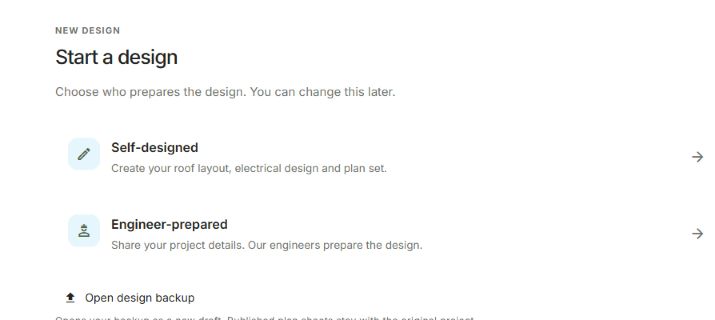
- Start a new project and choose Engineer-prepared.
- Enter the project name and address. Check that the site is correct.
- Open Project details to review the customer, installer and design preparation.
You can provide information without completing the technical design yourself.
2. Add the equipment you know
Start with the scope of work, then identify the products.
- Choose Solar or Solar + battery.
- Choose the power conversion arrangement and select your panels and inverter equipment.
- In Mounting, select the roof material. Choose rails and attachments if you know them.
Leave unknown equipment for the engineer. Confirm suggested values only after checking them.
3. Review the property
Describe the existing site using information you can verify.
- Open Property details and identify the electrical service arrangement.
- Enter the ratings you can read from equipment labels.
- Review Roof & structure. Add roof and framing details you know.
Optional technical details are useful preparation, not a request to guess engineering inputs.
4. Prepare your site files
Keep photos and documents together so the reviewer can find them.
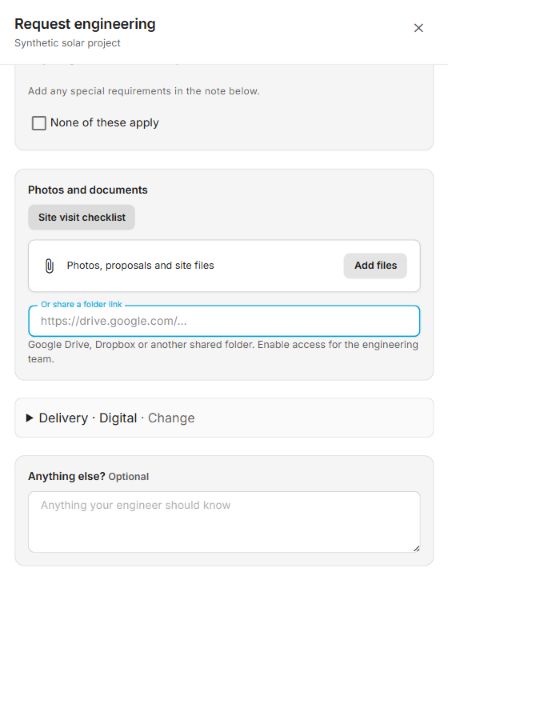
- Open Request engineering and review the site-visit checklist.
- Use the upload area for your site photos and documents, or provide a cloud-storage link.
- For a shared folder, check that the intended reviewer can access it.
Include readable equipment labels and enough surrounding context to identify their location. Interior electrical photos should be taken by a qualified installer or electrician.
5. Review the request
Check the request form before sending anything.
- Review the customer and project information.
- Describe unusual requirements, or confirm None of these apply. Resolve the required items identified by the form. Leave unanswered technical questions visible.
- Review any preparation-credit information. Credit is reviewed with the quote; it is not guaranteed by filling every field.
- When the required items are complete, choose Send request.
Opening Request engineering does not submit your project. You can review the form before sending.