The free single-line editor for solar.
Build a solar single-line diagram with equipment, connections, conductor sizing and design checks, right in your browser.
Account required · see pricing for plans and services.
See the full designer, start to plan set
Watch the full project workflow before creating your account.
Not a drawing app
It knows what a Powerwall is.
Pick real equipment from the library and it arrives with real specs. Draw a wire and it sizes itself. Change the inverter and the wires follow.
The difference between a sketch and a diagram is the data behind it.
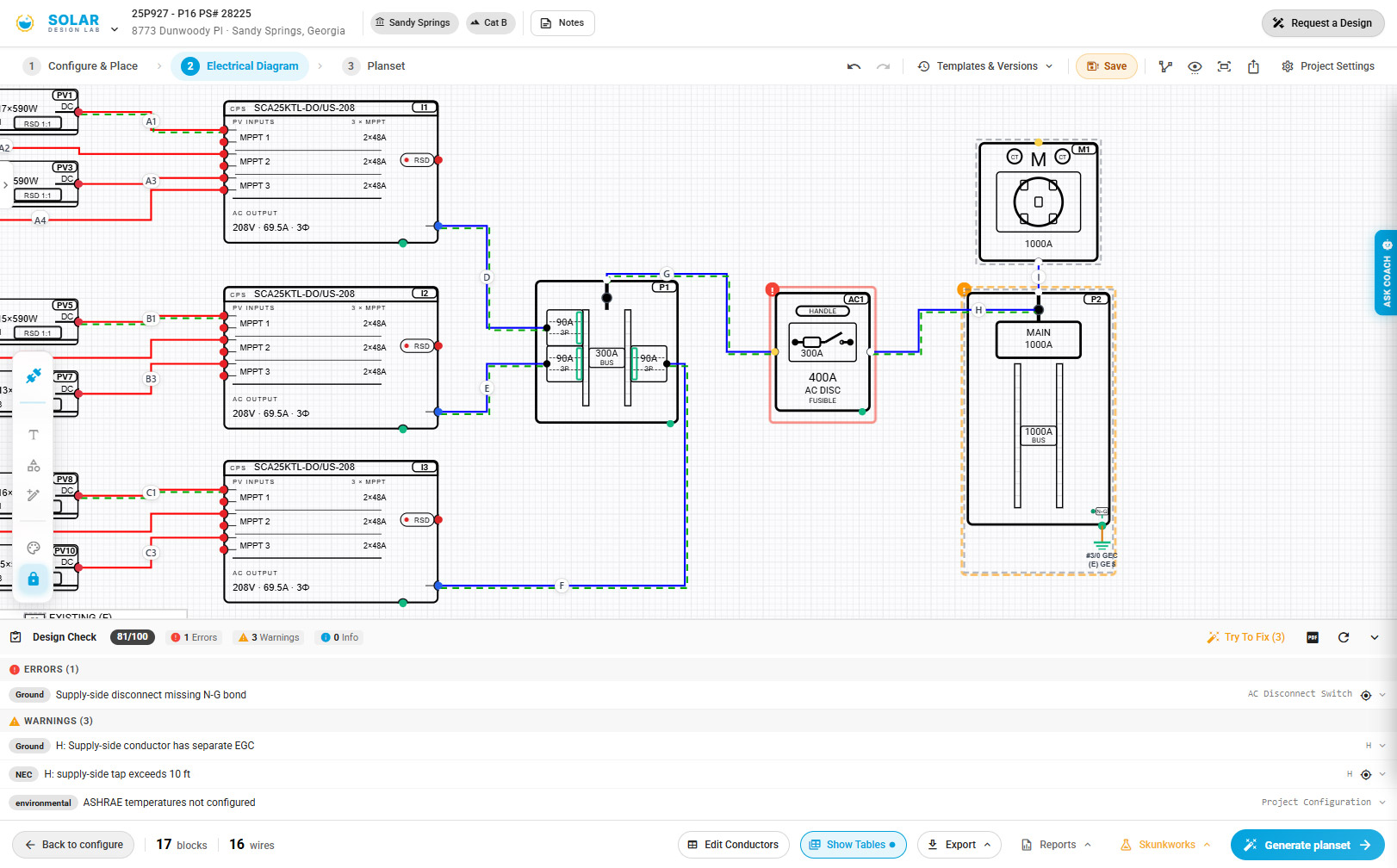
Wire sizes, OCPDs, and ground paths derive from the design. The checker catches what is missing for you to review.
Sketch to Diagram · early access
Already drew it? Upload it.
Photograph the one-line you sketched on site, or drop in a PDF or a screenshot from another tool in the early-access sketch-to-diagram workflow. Review the recognized equipment and connections before using the result.
Template tools vs this
A template is a picture. A design is live.
Template tools hand you a clean sheet and leave the engineering to you. You still pick the conductor. You still check the breaker. The labels the inspector wants are still your problem, which is why those tools tell you to add them as required.
This editor carries the real equipment specs, sizes the conductors as you connect them, and runs the code checks while you draw. Starting is just as fast. What you end up holding is not the same thing.
A template gives you
- A drawing with generic symbols on it
- Wire sizes you look up and type in yourself
- Labels you add as your AHJ requires
- A PDF, often after you hand over an email
A live design gives you
- Real equipment carrying its own specs
- Conductors and breakers that size themselves
- Code checks running while you draw
- Conductor schedules linked to your design
If the tool cannot size the wire, you are still doing the engineering by hand. That is fine for a simple job. It is worth knowing which one you are holding when the job is not simple.
Step-by-step guides
Know what to do next. Follow a clear path.
Walk through your first solar project or prepare a request for our engineering team. The guides explain what to enter, what to review, and what you can leave for an engineer.
Start with the one-line. Continue with a full project.
Create an account to work in one designer, from equipment and electrical connections to roof layout and plan-set review. Available tools and downloads follow your project access.
Need more projects? Compare pay-per-job and Production pricing.
Your design assistant
Meet the agent. You're still driving.
Bring your proposal and ask for help filling in the project details. Work through missing information, ask about your design and review suggested changes before moving on.
Full project tools, AI, imagery and downloads depend on account access and usage allowances. Professional engineering services are quoted separately.
FAQ
Questions, answered straight
Is the solar diagram tool really free?
Create an account to start designing. See pricing for project options and paid plans. Engineering services are quoted separately.
What is a solar single-line diagram?
It is the wiring drawing for a solar system: your panels, inverter, battery, switches, and breaker panel, with a line for each electrical connection. It is the drawing electricians work from and the one most permit offices ask to see. People often call it an SLD.
Can I use this for my DIY solar permit?
You can develop and check your design in the browser. Professional review and stamping are separately quoted services where offered; requirements depend on your project and jurisdiction.
Do I need to install anything, or sign up first?
No installation is needed. Create an account or sign in to use the browser-based designer. You can watch the walkthrough and read the guides before creating an account.
Where can I learn the workflow?
The Learn page has step-by-step guides for a solar-only design and an engineering request. You can read them and watch the walkthrough before creating an account.
What equipment is in the library?
The guided designer offers supported panel, inverter, battery and connection equipment. Available choices depend on your system configuration. Review the selected model and ratings against your actual equipment; do not substitute a similar model just to continue.
Is this a single line diagram template tool?
The designer builds an editable electrical drawing from your equipment and connections. The examples on this page are previews for reference; they do not preload a project. Start your own design with the equipment you plan to use.
Can electricians use it for work that is not solar?
The guided workflow is built for solar and solar-plus-battery projects. Its equipment library also includes supporting electrical equipment. If you need a standalone non-solar workflow, contact us to confirm that your project is supported.
What about PDF downloads?
An account is required to save your work. Download your plan set from the designer, subject to your account and project access. SDL engineering review and stamping are separate services.
How do I manage my paid account?
Available paid options are shown in your account. Subscriptions renew until cancelled. Open Billing & usage to manage your subscription, view invoices or cancel renewal.
Your system, drawn properly, tonight.
Account required · see pricing for plans and services.