Power control · Step-by-step guide
Power control: a setting for the installer
Understand the PCS tags on your drawing, the calculated setting, and what the installer needs to enable.
Before you start
- Power control (PCS) reduces supported solar or battery output when needed to protect the identified equipment. SDL derives the setting from the equipment, panel ratings and connected drawing.
- This Tesla example shows a 160 A Panel Limit protecting a 200 A bus. Use your project’s calculated setting, not this example’s number.
1. Start with the actual panel ratings
Open Details, then Property and Electrical service.
- Check Main breaker and Main busbar against the installed equipment. They are separate ratings; do not increase either value to make a design work.
- Check any downstream or backup panel ratings that apply to the project.
- Read Required power control. SDL calculates the setting for supported arrangements. A smaller protected panel can require a lower limit.
Panel Limit does not replace breakers or permit smaller load feeders. The existing panel keeps its nameplate rating.
2. Read the PCS tag on the drawing
Open Electrical diagram. If the drawing is empty, choose Generate the one-line. Open a PCS tag on the controller, protected panel or circuit.
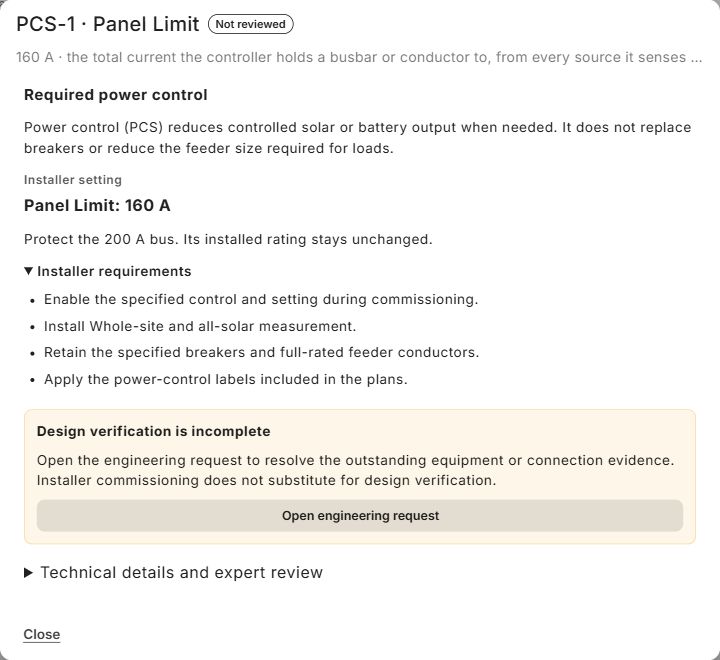
- Read the function and Installer setting, then check which equipment it protects.
- Expand Installer requirements for the commissioning, sensing and labeling instructions.
- If a design check remains open, read its explanation. Commissioning the equipment later does not resolve missing evidence or an incorrect connection now.
This example is not marked complete. Technical details and expert review is available for the relevant expert; it is not a routine customer confirmation that makes the design valid.
3. Hand off the setting to the installer
The practical instruction in this example is: enable Panel Limit at 160 A during commissioning.
- Use the setting and protected equipment identified for the finished design when preparing the installation handoff.
- The qualified installer configures the manufacturer’s control, verifies its sensing, and applies the required labels. Changing a value in SDL does not program the physical equipment.
- Keep the specified breakers and conductor sizes. Solar outside the control still needs its separate checks.
Some supported functions are factory-programmed and need no installer-entered setting. Follow the function shown for the selected equipment.