Manual wiring · Step-by-step guide
Draw a wire between equipment
Connect Powerwall 3 to Gateway 3, read terminal feedback, and find the resulting circuit.
Before you start
- Open Electrical in a practice project with Powerwall 3 and Gateway 3 on the drawing.
- The connection must not already exist. This example starts with the Powerwall AC output disconnected.
1. Start at the named terminal
Choose Electrical diagram and use Fit drawing to see the equipment.
- Find AC Output on Powerwall 3. Click its connection point to start the wire.
- Look for Drawing Wire. You can click empty canvas to add a bend, or continue directly to the destination.
- Press Esc to cancel before completing the wire.
2. Check the destination
For this example, use Gateway 3’s Internal panelboard, not its Supply or Backup terminals.
- Point to Internal panelboard and read the connection feedback.
- The tested pair shows Connection check passed and a 60 A, 2-pole protection requirement.
- A wrong terminal shows Connection needs correction with a reason. Read the name and message, not just the color.
This is the tested Powerwall 3 and Gateway 3 pair. Other products have different terminals. A passed connection check covers this connection, not the whole design.
3. Finish and inspect the circuit
Click the gateway’s Internal panelboard connection point to finish.
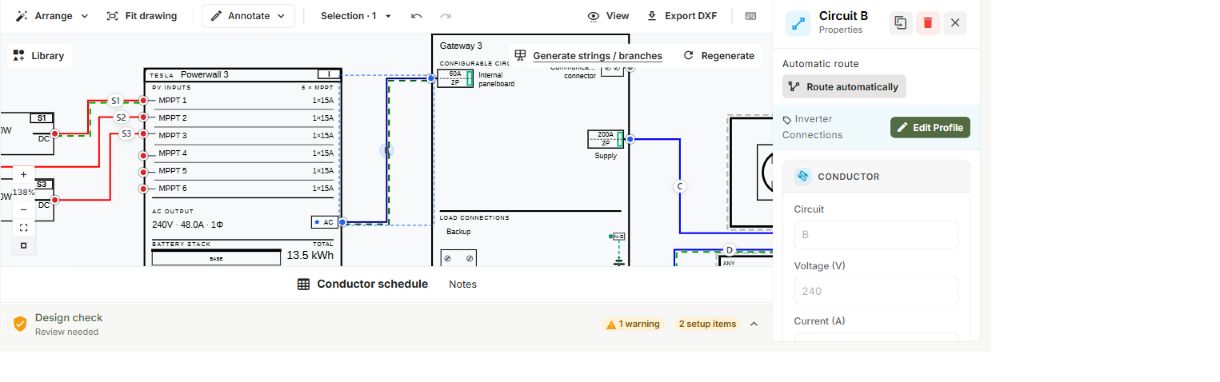
- The completed wire is selected and its circuit properties open.
- Note the circuit letter. This example became circuit B.
- Check the endpoints. Use Length (ft) for the actual installed route length; the line’s drawn length is not a measurement.
4. Find the same circuit in the schedule
Open Schedules & notes, then Conductors.
- Find the circuit letter. Circuit B appears as Battery AC in this example.
- Review the calculated values and remaining findings. Recalculate refreshes the table from the drawing.
- Wait for Saved before leaving. Reopen the project to check the connection and any entered length.